
Upgrade good strategies from surface-level execution to real B2B LinkedIn growth.
The problem with LinkedIn growth has never been the platform, but how easily good strategies turn stale.
LinkedIn works because the opportunity is still very real: LinkedIn has over 1 billion members across 200+ countries, including more than 65 million decision-makers and 10 million C-level executives (LinkedIn Business).
And yet, most approaches still look the same: overused content formats, generic outreach templates, same playbooks reused without much thought.
But high potential doesn’t mean easy wins. The platform is noisy, the competition for attention is real, and a half-hearted approach — a sparse profile, sporadic posts, and generic connection requests — will get you exactly nowhere.
As of February 2026, the algorithm also doubles down on a strong personal brand. The shift is away from rewarding frequent posting and toward rewarding relevance, genuine engagement, and real attention. (LinkedIn Pulse)
A LinkedIn strategy that actually moves the pipeline forward has three interconnected layers:
- a profile that builds instant credibility,
- a content approach that earns trust before you ask for anything
- an outreach process that turns the right connections into real conversations.
This guide covers all three as succinctly and brutally honest as possible. Actionable, clear steps you can apply right away – no fluff and dragged on ideas.
Part 1: Your LinkedIn Profile — The Foundation Your Strategy Rests On
Your LinkedIn profile is doing work whether you’re logged in or not. Think of it as a landing page, not a resume. Especially with the new 2026 algorithm update.
A resume lists what you’ve done. A landing page answers one question: what’s in it for the person reading this?
When you send an outreach message, people check your profile before they reply.
When you comment on a post, people click through.
When someone Googles your name, LinkedIn is usually the first result.
If your profile doesn’t immediately communicate who you are, what you do, and why someone should care, you’re losing leads.
LinkedIn’s algorithm update: how profiles are evaluated
With the 2026 update, your profile is a live credibility engine. The platform evaluates you as a whole: your headline, About section, work history, and daily behavior all combine into a single reputation signal.
When you publish a post, the system doesn’t only scan the content. It analyzes who you are, what you’ve demonstrated expertise in, and how you consistently show up in conversations. With that in mind, it decides where your content belongs and who should see it.
Profile Photo and Banner: The First Two Seconds
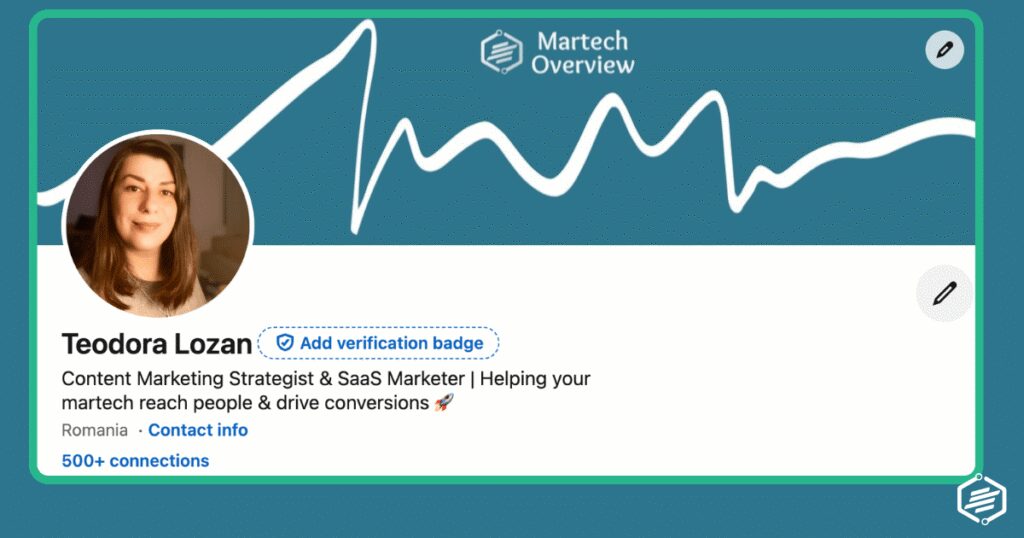
Your banner image is 1584 x 396px of prime real estate that most people waste. Use it to reinforce your value proposition: what you do, your company name, a headline tagline, or even a social proof element like a media mention or key result.
Tools like Canva make this a 15-minute job.
Your profile picture also does a lot of heavy lifting. People form impressions immediately. A professional, well-lit headshot signals credibility and approachability.
Skip the cropped group photo, avoid the beach vacation shot, and absolutely don’t leave the default grey silhouette: it tells people you either don’t care or you’re not active.
❗️Hint: Don’t run to AI to generate an image for you either. It will always look fake and overproduced. People want to see you, not Chat GPT or Gemini.
Headline: The One Line That Determines Whether People Keep Reading
LinkedIn gives you 220 characters for your headline. Use them to describe the outcome you deliver, not just the role you hold.
Compare these two examples:
- “Head of Marketing at SaaS Co” tells someone your title.
- “Helping B2B SaaS companies build demand gen systems that fill pipeline without burning budget” tells someone exactly what value you bring and who you serve.
One sparks curiosity. The other gets scrolled past.
Your headline appears on every comment you post, every connection request you send, and every search result you appear in. It’s the most-read line on your entire profile.
About Section: Your 30-Second Elevator Pitch in Text Form
LinkedIn’s About section is your best opportunity to speak directly to the type of person you want to attract.
Most people fill it with a bland third-person bio. The better approach: write it in first person, lead with the problem you solve, and be specific about who you help and how.
A strong About section follows a simple structure:
- Open with a hook that speaks to your audience’s pain point.
- Explain what you do and for whom.
- Include 2-3 concrete results or proof points.
- End with a clear call to action — whether that’s connecting, visiting your website, or booking a call.
You have 2,600 characters. I’m not saying use them all, but use them wisely. Especially the first two lines, because that’s all that’s visible before the “see more” click.
Most of us still have some fine-tunning to do.
Featured Section, Experience, and Social Proof
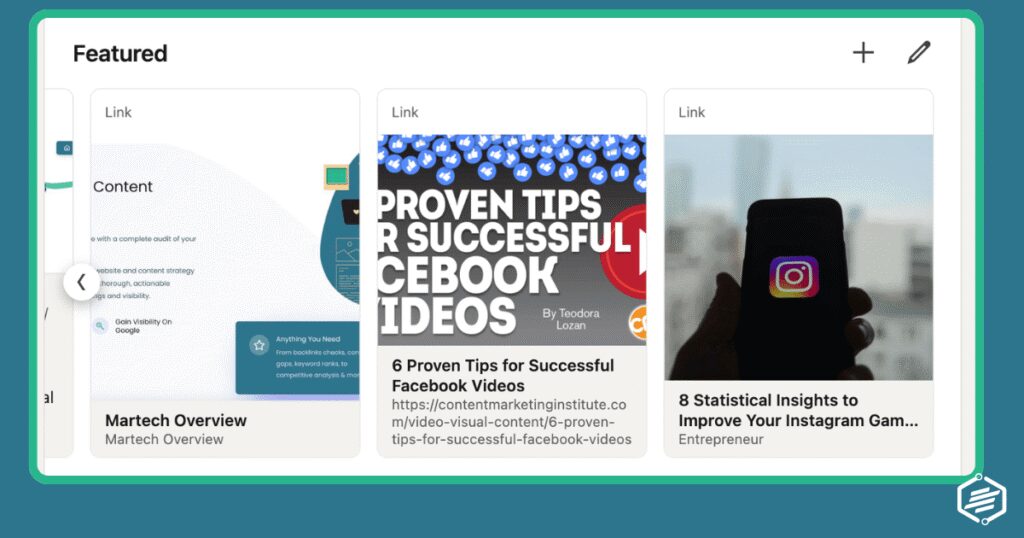
The Featured section sits near the top of your profile and supports everything your headline and About section claim.
Use it to pin your best content: a strong post, a case study, a media appearance, a key piece of original research, or a link to a newsletter.
For your Experience section, the job title and company aren’t the point — the outcomes are. For each role, lead with impact: what you built, what you grew, what you changed, and by how much.
Numbers are your friend, if you have them: “Grew organic pipeline from LinkedIn by 40% in 6 months by implementing a structured content and outreach programme” is far more compelling than “responsible for LinkedIn strategy.”
Skills endorsements matter less than recommendations. A handful of genuine, specific recommendations from clients or colleagues carry more weight than 50 endorsed skills. Ask for them; most people are willing to write one if you reach out directly.
Part 2: LinkedIn Content Strategy — Build Authority Before You Ask for Anything
Content on LinkedIn does something outreach alone can’t: it builds a record of who you are before someone has ever spoken to you.
When a prospect receives your connection request and visits your profile, your recent posts are the first thing they read.
A handful of valuable, relevant posts serve as social proof that you know your stuff, tipping the balance toward acceptance.
Beyond profile visits, consistent LinkedIn content compounds over time. Posts that get engagement surface to your connections’ networks.
A newsletter that people subscribe to brings them back regularly. Articles can rank in Google. Groups place you in front of people who aren’t even connected to you yet.
The golden rule, which gets said so often it barely registers anymore, but is still true, is help first, sell later.
Content that teaches, provokes thought, or solves a problem earns trust. Content that promotes earns unfollows. Big caveat here, unless that promoted content is valuable.
Truth be told, any content you produce should solve a problem – posts included. Be useful.
LinkedIn’s algorithm update: how content is evaluated
The algorithm is increasingly functioning as a trust filter: if your content resembles spam patterns or generates only shallow engagement (think emoji-only comments and “great post!” replies from the same five people), it simply doesn’t get distributed further.
What the algorithm does reward in 2026: expert-led content like frameworks, industry breakdowns, and genuine insights — while actively reducing distribution for clickbait, vague storytelling, and overly promotional posts. (SocialBee)
Comments remain the single most important engagement signal, with comment-heavy posts 2-3x more likely to surface in second and third-degree connection feeds. (Speedwork)
Early engagement still matters — the first 60 to 90 minutes after posting remain the window that determines whether LinkedIn expands your reach, but the quality of that engagement now outweighs the speed of it. (SocialBee)
Post with a clear point of view, write for a specific audience, and give people something worth responding to. That’s what the algorithm is built to find.
LinkedIn Posts: Native Content Is the Highest-Reach Format
LinkedIn’s algorithm heavily favours native text posts. Posts that keep people on the platform, comments that spark discussion get distributed further. The platform wants engagement, and it rewards content that generates it.
However, people might not comment or engage with your posts – especially at first – but those hidden impressions can translate to eyes on your business. Keep going.
- Personal approach: Take a personal experience approach when you post: a hard lesson learned, a result achieved, an opinion on industry practice.These tend to outperform polished corporate content. Data with context beats data alone. Frameworks people can apply immediately generate saves and shares.
- Post when your audience is active: Post at the start of working hours in your target audience’s timezone. LinkedIn is a professional platform, and engagement spikes during business hours.
- Post consistency and volumes: Practically speaking, aim for 3-5 posts per week. That’s the frequency threshold where the algorithm starts to work in your favour and your name becomes a regular fixture in your network’s feed.
- Tried and tested posts: Some topics stand out more than others. If you’re out of ideas, look at what works for others.
A few topics that consistently perform well:
- The contrarian take: challenge a widely-held belief in your industry with data or experience to back it up
- The behind-the-scenes breakdown: what you actually did to achieve a result, step by step
- The short list: 5 things you stopped doing that improved X, 3 questions to ask before Y
- The opinion post: a clear stance on a trend, tool, or tactic with your reasoning
- Social proof in story form: a client result framed as a narrative, not a testimonial
As for the formats, here’s what tends to bend the needle:
- Carousels & documents have the highest engagement (carousels/document posts lead engagement vs other formats) via Postunreel.
- Native short videos have strong reach & interaction (video content showing strong engagement growth & impressions on LinkedIn) via Engagecoders.
- Polls have extremely high impressions (polls deliver significantly higher reach than average posts) via Engagecoders.
- Text with a hook are effective if it grabs attention (text-only posts still perform when the first line hooks the reader) via ConnectSafely
- Links included thoughtfully can boost engagement (posts with external links saw higher interactions and impressions) via SearchEngineJournal.
LinkedIn Newsletters: Own an Audience That Comes Back
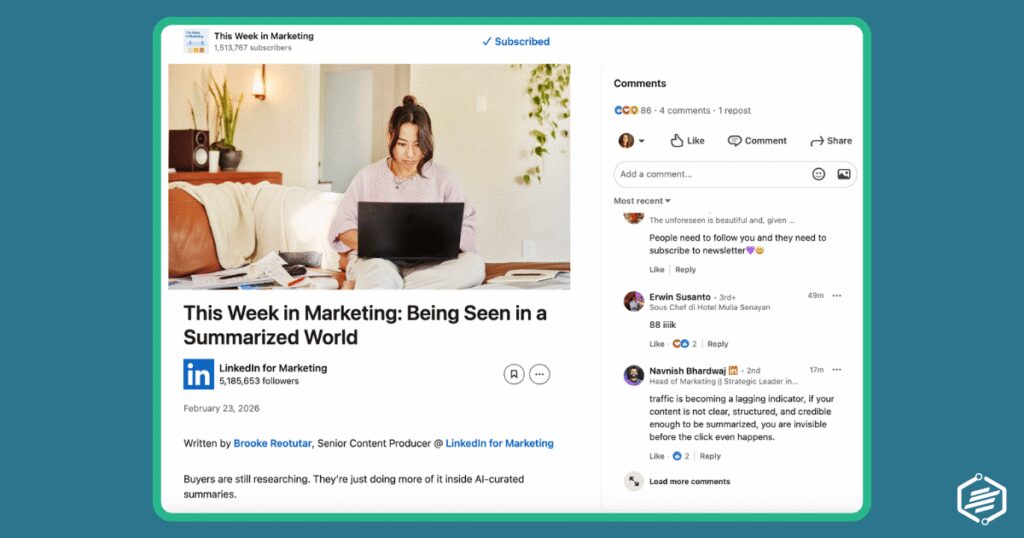
When you publish a newsletter, LinkedIn notifies all your followers automatically. That’s free distribution to your entire audience every time you send. Subscribers also get email notifications, which means you’re reaching people outside the feed.
The key difference between a newsletter and an article is the subscription relationship. Subscribers have opted in for repeated content from you. That creates a warm, recurring touchpoint that compounds over time, especially if your content stays consistent in topic and quality.
How to use LinkedIn Newsletters: For marketers and sales professionals, a LinkedIn newsletter works best when it covers a specific, recurring theme. Not “marketing tips” (too broad) but “one B2B demand gen breakdown every two weeks” or “what I learned running LinkedIn campaigns this month.” Specificity attracts the right subscribers and filters out the wrong ones.
Publish consistently ( ideally bi-weekly or monthly), and treat each edition as a standalone piece of value. Readers who find your newsletter through search or shares and immediately see three quality editions are far more likely to subscribe.
LinkedIn Articles: Long-Form Content That Works for SEO
LinkedIn articles live on your profile permanently and are indexed by Google. That makes them valuable for search visibility on topics where you want to be found — particularly useful if your name or expertise is something people search for.
They’re less about feed distribution (articles generally get less reach than native posts) and more about permanence and authority.
Articles work well for deep-dives: detailed guides, original research summaries, thorough point-of-view pieces.
A well-written LinkedIn article on a specific topic can rank in search and bring in readers months or years after you published it.
One effective approach: use your native posts to test topics and angles. When a post on a specific topic gets strong engagement, expand it into a full article. The post validates the demand; the article delivers the depth.
LinkedIn Groups: Reach People Outside Your Network
While most of your competitors are fighting for attention in the main feed, active industry groups are quieter, more targeted, and full of engaged professionals who are actively looking for solutions to specific problems.
Beware of spam: posting promotional content in groups is not always allowed. When it is allowed, it most likely get ignored through thousands of other links.
The biggest tactical advantage of groups is that you can message any fellow group member directly without being connected, and it doesn’t count towards your weekly invite or InMail quota. For outreach purposes, that’s a significant unlock.
Find 3-5 active groups in your target audience’s industry (not your own industry, theirs). Join them, follow the threads, and contribute where you have genuine value to add. Answer questions, share relevant frameworks, and add context to discussions.
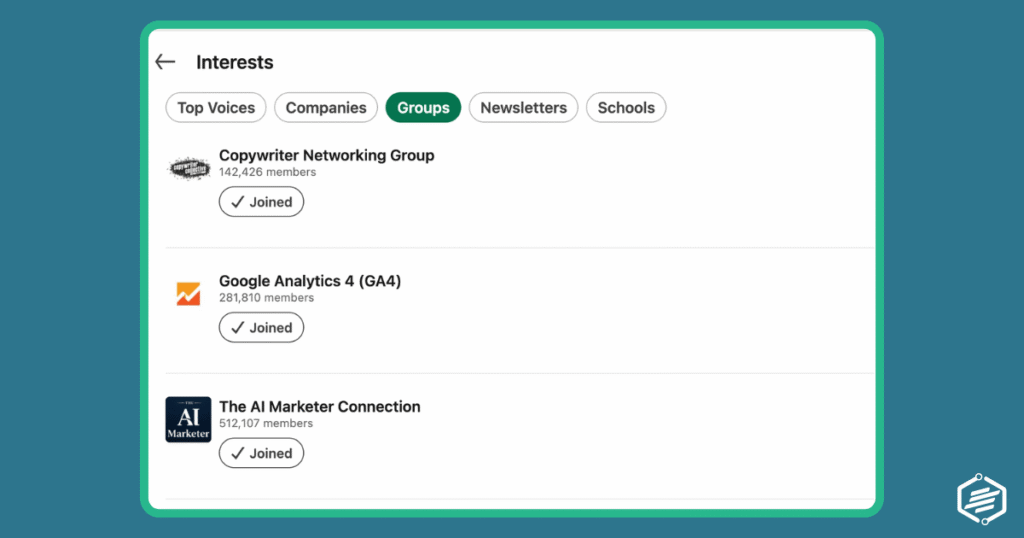
Posts in groups have no algorithmic penalty for engagement timing and can surface to members who haven’t seen your main profile content.
Group member outreach is particularly effective because you have a built-in context for the conversation: you’re both in the same professional community.
That shared context raises reply rates significantly compared to cold outreach from a stranger in the feed. Besides, people who recognize your name are much more likely to respond.
Content Calendar: Consistency Beats Perfection
The most common content mistake is bursts of activity followed by weeks of silence. The algorithm penalises inactivity, and your audience loses the habit of seeing your name.
Consistency at a lower frequency always beats sporadic intensity.
Ideally, a simple, sustainable content calendar for LinkedIn looks like this:
- 3-4 native posts per week (text-first, opinion and insight-driven)
- one longer piece (either a newsletter edition or an article every 2-4 weeks),
- active engagement in 2-3 groups as an ongoing background task.
But don’t get overwhelmed if that output sounds too intense. You can start off slower. It’s more important to just be present, instead of going dark just because you didn’t reach your quota.
❗️Batch-write your posts in a single session. Blocking an hour on Monday to write the week’s content is more efficient than trying to come up with something daily.
Keep a running list of topics, observations, and results that can be turned into posts. Every client conversation, campaign result, or industry debate is potential material.
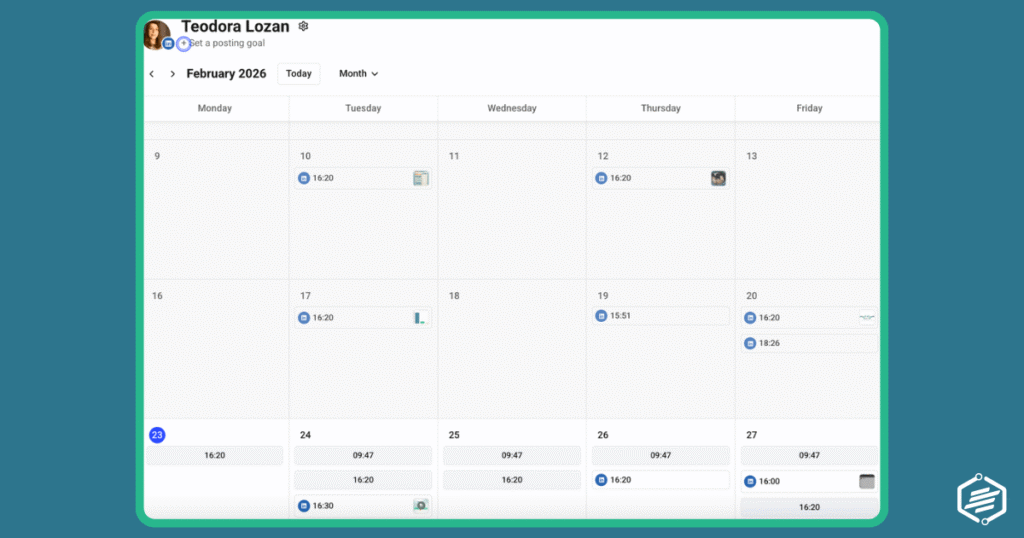
Many tools can help you with your scheduling needs. Buffer is my personal go-to as their free plan is great for people just starting off: it allows you to connect 3 accounts and allows 10 scheduled posts per account.
Canva is also great for content marketers who are already using it for advanced designs and can make use of the paid plans for designs, videos, and social media scheduling..
Part 3: LinkedIn Outreach Strategy — Turning Connections into Conversations
LinkedIn outreach means strategically contacting people who might be interested in what you offer: new clients, co-marketing partners, content collaborators, or potential hires.
Done right, it’s one of the most efficient prospecting methods for any B2B LinkedIn strategy. Done wrong, it’s spam that damages your brand and wastes your time.
Companies using LinkedIn for lead generation report up to 2x higher conversion rates compared to other social platforms (LinkedIn Business).
A strong profile and consistent content do the groundwork. Outreach is where you go on offence.
The numbers are compelling. Over 70% of buyers are open to conversations on social media, and LinkedIn’s own research shows that social selling leaders are 51% more likely to hit their quotas.
The platform reaches 65 million decision-makers. That’s the audience email sequences and cold calls routinely fail to penetrate.
Start With a Goal: What Do You Want to Achieve?
Every outreach campaign needs one clear objective. The most common mistake is running outreach as a generic “let’s connect” exercise without a defined next step.
If you don’t know what a successful outcome looks like, you won’t build the right message to get there.
Common outreach goals include:
- generating leads for a product or service,
- building co-marketing partnerships,
- promoting content to niche publishers,
- growing your network in a specific industry,
- recruiting for open roles.
Each goal requires a different message, a different audience, and different success metrics. Don’t mix them in the same campaign.
Prospecting: Find the Right People Before You Write a Single Word
Prospecting is the most time-consuming part of outreach and the most important to get right.
I cannot stress that enough: I’ve personally had more responses with a short list of 50 contacts than with lists of hundreds of prospects.
Contacting the wrong people produces low results, but also trains the algorithm to see your account as low-quality, which in turn wastes every minute you spend on it.
Your prospecting list should define exactly who you’re looking for before you start searching.
Relevant factors typically include:
- industry
- job title and seniority level – and whether they’re in a decision-making role.
- company size
- geography
LinkedIn’s Ideal Customer Profile (ICP, or the profile of your best-fit customer) should be your filter.
You have several options to find your prospects, each with different capabilities:
- Free search bar: Limited to 1,000 results (10 per page, 100 pages) with basic filters. Good for small, targeted campaigns.
- LinkedIn Sales Navigator: Unlimited searches displaying up to 2,500 results with 20+ advanced filters, Boolean search, saved searches, and job change alerts. The serious prospecting tool for anyone doing outreach regularly.
- LinkedIn Groups: Members of a group you’ve joined can be messaged directly, with no connection required and no invite limit applied. Highly efficient for targeted audiences.
Build your list before you write your messages. Quality matters far more than quantity: a list of 100 well-qualified prospects will outperform a list of 1,000 loose matches every time.
The Three LinkedIn Message Types: Invite, Direct Message, and InMail
LinkedIn has three distinct ways to contact people, and each has different rules, limits, and appropriate use cases. Using the wrong format at the wrong moment is a fast way to get ignored.
- Connection Invite: This is your first contact with a second or third degree connection. You have 300 characters — roughly 2-3 short sentences. That’s not enough space to pitch. It’s enough space to introduce yourself, establish one point of relevance (mutual connection, same group, shared interest, relevant observation about their work), and give them a reason to accept. LinkedIn advises sending no more than 100 invites per week to stay within their guidelines, and it’s wise to warm up a new account by starting lower and increasing gradually. Acceptance rates above 30-40% are considered healthy.
- Thank-you message after acceptance: This is the step most people skip, and it’s where a lot of potential goes to waste. When someone accepts your invite, send a short, warm message acknowledging the connection. Don’t pitch. Just acknowledge, add a sentence of context about why you wanted to connect, and perhaps ask one relevant question. This is the start of the relationship — treat it accordingly.
- Direct Message: Once someone is a first-degree connection, you can message them freely with no character limit and no weekly quota. This is where your actual outreach conversation happens. Your first message after the thank-you should be focused on their situation and a specific, relevant observation or offer of value — not a sales pitch. Drip sequences (a planned series of messages sent over time) work well here: an initial message, followed by one or two follow-ups if there’s no response, each adding a new piece of value or context.
- InMail: InMails are paid messages to people who aren’t your connections. They follow an email-like format with a subject line (200 characters) and a body (1,900 characters). Monthly InMail credits depend on your LinkedIn plan: 5 with Career, 15 with Business, 20 with Sales Navigator Core, and up to 50 with Recruiter. You earn a credit back for every InMail that gets a response within 90 days. Use InMails for high-priority prospects where the connection request route hasn’t worked, or for senior contacts unlikely to accept cold invites.
Writing Messages That Actually Get Replies
The fastest way to get no reply is to start with “Hi [first name], I’m the head of X at Y company and we help businesses like yours…” That’s not a message, it’s a press release about yourself. Nobody woke up this morning hoping to read that.
Messages that get replies do the opposite: they start with the recipient, not the sender. A relevant observation about their work, a reference to content they’ve posted, a shared challenge in their industry, or a genuine compliment about something specific — any of these creates enough of a human moment to earn the next sentence.
Six principles that make the difference:
- Personalise beyond the first name — reference their company, a post they wrote, a mutual connection, or their specific role
- Offer something relevant before asking for anything — a useful resource, an insight, a connection to someone in your network
- Be specific about what you want — a vague “let’s connect and chat sometime” goes nowhere; a “15-minute call to share one specific idea” is easy to say yes or no to
- Keep it short — 3-4 sentences for an invite, 6-8 for a first message. Nobody reads essays from strangers
- Follow up once or twice – not every hour. Give 2-3 days between messages. Two follow-ups is the maximum before you move on.
- Match your tone to their profile — a startup founder with casual posts gets a different message than a VP at a Fortune 500
Drip Sequences: Plan the Conversation Before It Happens
A drip sequence is a planned series of messages sent over time, triggered by specific actions. The classic structure is: connection invite with a short note, a thank-you and opening message once accepted, a first pitch or value-add message a day or two later, and one or two follow-ups if there’s no response.
The key is to write each message in the sequence before you send the first one. This forces you to think about the full arc of the conversation and ensures every message adds something new — a different angle, additional context, a specific offer, a question. Repeating yourself across follow-ups is the surest way to get marked as spam.
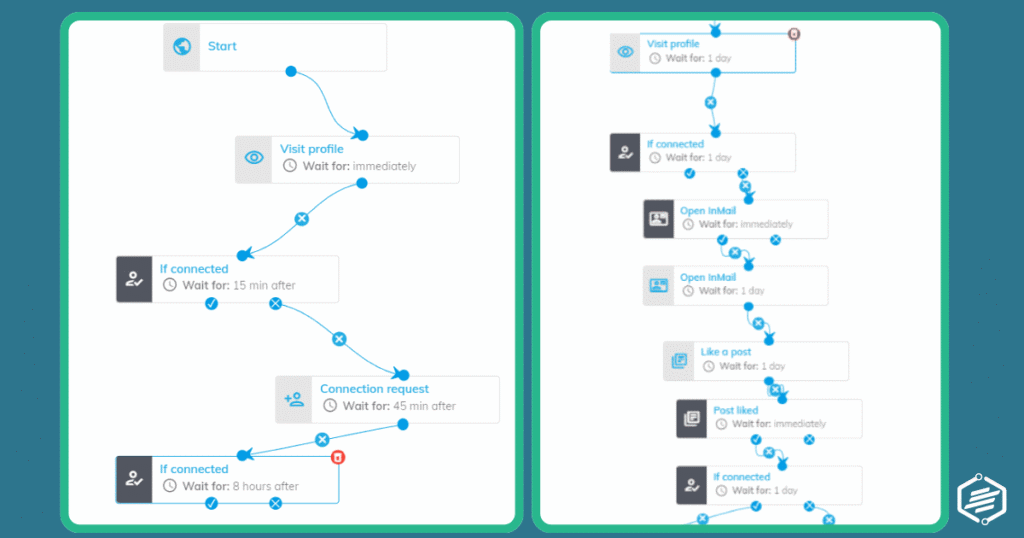
Most outreach tools let you build this sequence in advance, set time delays between each step, and pause the sequence automatically when someone replies. That last feature is important — nothing kills credibility faster than receiving a “just following up” message when you’ve already responded.
Outreach Use Cases for Marketers: Beyond Lead Generation
When they hear outreach, most people instantly think about sales pitches. Lead generation is the obvious use case, but it’s not the only one. LinkedIn outreach is just as effective for:
- Content promotion — reaching out to industry publishers and editors to pitch a guest post or get quoted as a source
- Co-marketing partnerships — finding brands with complementary audiences and proposing a joint webinar, report, or campaign
- Influencer and expert outreach — connecting with niche thought leaders who have the audience your product needs
- Market research and data collection — asking your network to complete a survey or participate in a poll for an industry study
- Client relationship nurturing — using LinkedIn messages as a personal touchpoint for existing clients beyond the usual email newsletter
- Discount and promotion amplification — sharing a time-sensitive offer directly with warm prospects who’ve engaged with your content
When done right, these initiatives have a huge impact both on brand authority, but also on conversions and sales.
Metrics to Track: What Actually Tells You If It’s Working
The vanity metrics (connections sent, connection count, profile views) tell you very little about whether your outreach is generating value.
These are the numbers that actually matter:
- Acceptance rate: Percentage of connection invites accepted. Below 20% means your invite message or targeting needs work. Above 40% is strong.
- Reply rate: Percentage of messages that get a response. For cold outreach, anything above 15-20% is solid. Below 10% suggests a message problem.
- Profile views from outreach: How many people who received your message visited your profile. Having a high number of profile views, but a low number of replies often points to a profile credibility gap.
- Meetings booked per campaign: The ultimate conversion metric. Track how many initial outreaches convert to a call or meeting.
- Lead quality by source: Not all LinkedIn leads are equal. Track which campaigns and which audience segments produce leads that actually progress through your pipeline.
- Content engagement correlation: Whether people who engage with your posts often accept and/or reply when you reach out — this validates the content-first strategy.
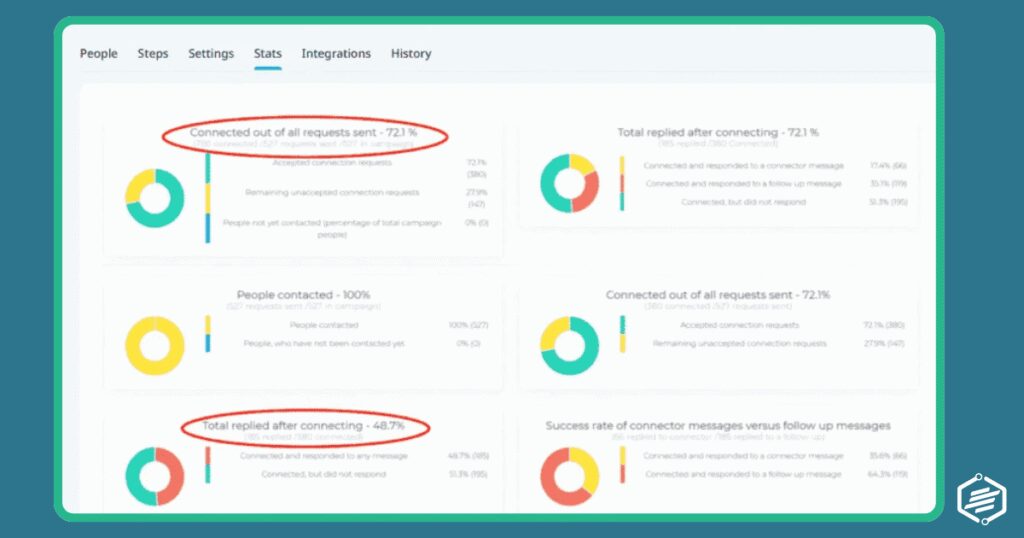
Following these metrics closely you’ll not only fill some numbers in your monthly report, but you’ll be able to accurately evaluate and adjust your strategy and workflow to improve those results.
LinkedIn Strategy Mistakes That Will Quietly Kill Your Results
Most LinkedIn strategy failures are slow-moving. You don’t get banned or flagged overnight. You just gradually get ignored, deranked, and filtered out. Here are the most common culprits.
- No clear goal per campaign: mixing outreach for leads, partnerships, and network growth in the same message sequence produces confused, unfocused messages that convert nothing
- Mis-targeting the audience: contacting people who can’t actually say yes is a waste of everyone’s time. Always verify the prospect is in a decision-making or influencing role before adding them to your list
- Sending the same generic message to everyone: LinkedIn’s algorithm deprioritises accounts with low acceptance and reply rates. Generic messages hurt both your immediate results and your long-term account standing
- Not warming up a new account: sending 100 invites on day one from a brand new profile is a fast track to a restriction. Start at 10-15 per day and increase gradually over 2-4 weeks
- Ignoring LinkedIn’s weekly limits: 100 connection invites per week is the safe threshold. Going beyond it risks a warning or a temporary restriction of your account
- Skipping the follow-up: most prospects don’t reply to the first message. One or two well-timed, value-adding follow-ups can double your response rate
- Endless follow-up: most people are never going to be interested, and that’s ok. Keeping them in a loop of endless follow-ups only creates a bad rep for you, as this can be considered spamming. If you’ve followed up 2 or 3 times, that’s enough. Time to stop.
- Never cleaning up pending invites: unanswered invites pile up and can signal low quality to the algorithm. Review and withdraw invites that have been sitting for more than 2 weeks
- Treating content and outreach as separate strategies: they work best together. Prospects who’ve seen your posts before receiving your message are significantly more likely to accept and reply
- Posting content inconsistently: one great week followed by three weeks of silence trains LinkedIn’s algorithm to stop distributing your content. Consistent mediocre beats brilliant but sporadic
- Making every post promotional: the rule of thumb is: no more than 1 in 5 posts should be directly promotional. The rest should be educational, insightful, or conversational
Part 4: LinkedIn Martech Tools to Scale Your Strategy
Process and strategy first, tools second. The tools below amplify a well-designed LinkedIn strategy. They won’t fix a broken one.
That said, once your process is defined, the right stack can save significant time and surface opportunities you’d otherwise miss.
LinkedIn Sales Navigator — The Prospecting Backbone
Sales Navigator is LinkedIn’s own paid prospecting tool and the most important one in this list. It offers 20+ advanced search filters, Boolean search, saved searches, lead and account alerts (job changes, keyword mentions), and recommended leads based on your saved searches.
The real advantage over the free search bar is depth and precision — you can find leads that have changed jobs recently, leads at companies that are hiring (a signal of growth and potential budget), and leads who have engaged with your content or your competitors’ content. For any serious LinkedIn outreach effort, Sales Navigator pays for itself quickly. The core plan starts around $100/month.
Best for: Sales teams, marketers with defined ICP accounts, and anyone doing regular outreach at scale.
Watch out for: The data can be slightly out of date, and Sales Navigator doesn’t let you export lists natively — you’ll need a third-party tool for that.
If you’re running outreach campaigns at any meaningful volume, automating the repetitive parts is non-negotiable. There are 2 types of tools out there: cloud-based software, or browser extensions.
However, this task is more difficult than it seems, as LinkedIn forbids automating outreach with anything else than its own tools.
If you have a choice, my suggestion would be to pick a cloud-based tool, as they tend to be safer to use and avoid detection better than browser extensions.
Expandi and Dripify are two of the more reputable cloud-based LinkedIn automation tools — meaning they run in the cloud, not through a Chrome extension, which makes them significantly safer for your account.
Both tools let you build drip sequences with personalised placeholders, set time delays between steps, auto-withdraw pending invites, and track campaign metrics.
- Expandi is particularly strong on personalisation features;
- Dripify has a cleaner interface for teams new to automation.
Expect to pay in the $40-$100/month range (depending on the plan) for Dripif, and $79 and above for Expandi.
Best for: Marketers and sales teams running consistent outreach campaigns who want to automate prospecting list building, invite sequences, and follow-ups without spending hours doing it manually.
Watch out for: Automation doesn’t fix a bad message strategy. If your templates are generic, automation just makes you generically spam more people, faster. Always test message sequences manually before scaling.
Shield Analytics — Analytics That LinkedIn Doesn’t Show You
This is not breaking news: LinkedIn’s native analytics are limited. But non-native products like Shield (and other similar tools) can fill the gap by tracking post performance, follower growth, engagement rate trends, and content reach over time in a way that’s actually useful for making decisions.
You have many options for tools here, but Shield is a product created entirely around LinkedIn analytics, without including other platforms. So if your social strategy is solely focused on LinkedIn, this is a great way to get your analytics without spending money on features and platforms you don’t use.
For marketers running a content-led LinkedIn strategy, Shield helps you understand which post formats and topics perform best, what your optimal posting times are for your specific audience, and whether your content is compounding growth over time.
Plans start at $25/profile/month.
Best for: Anyone managing LinkedIn content seriously: creators, marketing teams, executives building thought leadership.
Watch out for: It’s analytics only, meaning it doesn’t help you create or distribute content, and won’t add value until you have enough posting history to spot patterns.
Taplio — Content Creation and Scheduling
Taplio is an AI-assisted content tool built specifically for LinkedIn. It helps you write posts, build content calendars, schedule in advance, and find post ideas based on trending topics in your industry.
It also has a lightweight CRM feature for tracking who’s engaging with your content, as well as some freebie tools you can play with such as a post generator or video downloader.
Plans start at $30+ /month (depending on monthly or annual payment plans).
Best for: Marketers who want to maintain consistent LinkedIn posting without it becoming a daily time drain. The AI writing assistance speeds up ideation and drafting significantly, though you should always edit heavily to maintain your own voice.
Watch out for: AI-generated posts from Taplio have a recognisable style if you don’t customise them. The tool works best as a starting point, not a final output.
Explore and compare LinkedIn tools by feature, price, and use case at tools.martechoverview.com.
Explore more tools 👉
https://tools.martechoverview.com/
Find the right tool, with the right features, at the right price.
LinkedIn as a System, Not a Side Project
The professionals getting consistent results from LinkedIn aren’t posting randomly, sending occasional connection requests, and hoping for the best.
The top LinkedIn voices are running a system: a profile that converts visitors into connections, content that builds authority and trust over time, and outreach campaigns that convert that trust into real conversations.
None of this requires hours every day. A well-structured LinkedIn strategy takes 30-45 minutes daily: a post in the morning, 20 minutes of outreach work, and 10 minutes of engagement. What it does require is consistency and intentionality, treating LinkedIn as a serious channel, not an afterthought.
Start with the profile. Then build the content habit. Then layer in outreach once you have something worth linking to when a prospect checks your profile.
Each layer makes the others more effective.
What’s the weakest link in your current LinkedIn approach: the profile, the content, or the outreach?